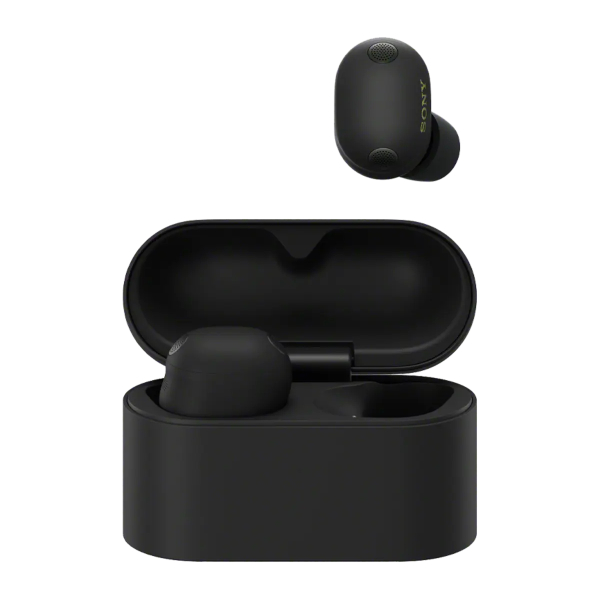



The Sony WF-1000XM6 earbuds are a precision-engineered piece of technology. To ensure you get the best performance for years to come, it's important to understand one of its most vital features: Battery Care.
If you've noticed your earbuds aren't hitting 100% or show slightly different percentages between the left and right sides, don't worry - your device isn't malfunctioning. In fact, it’s working exactly as intended to protect its lifespan.
※ Battery Care is not enabled by default factory settings. However, it may be activated automatically due to factors such as high temperature.
What is the Battery Care Feature?
Battery Care is a feature that limits the maximum charge level to help extend the battery’s lifespan.
Most battery experts agree that charging a device to 100% every single time isn't ideal for long-term health. The Battery Care feature is an intelligent algorithm that:
Limits Peak Voltage: Tells the case to stop charging the earbuds before they reach 100% to reduce chemical stress
Adapts to Daily Use: It is the perfect setting for regular use, as most users pop their earbuds back into the case after a few hours and won't notice the slight difference in charge
Extends Overall Lifespan: While you might not see the difference day-to-day, your battery will "feel" the benefit in its total longevity
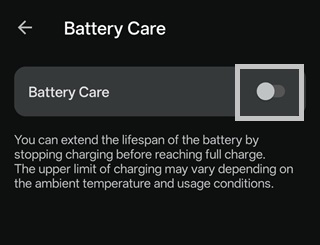
How to Enable / Disable Battery Care
Open the Sony | Sound Connect app
Go to the "My Device" tab and select Device Settings
Tap Power/Battery
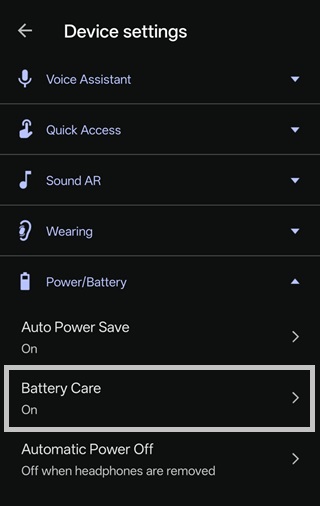
Toggle On / Off for Battery Care
Bonus Tip: Auto Power Save
If you find yourself needing to squeeze every last bit of power out of your earbuds during a long day, you can also enable Auto Power Save. This feature automatically reduces battery drain by turning off specific functions—like voice control, Speak-to-Chat, DSEE Extreme, and EQ settings - whenever your charge dips below 20%.
What to Expect When Enabled
When Battery Care is active, keep in mind:
The Charging Case: The case itself does not have a "Battery Care" limit because research shows most people only need to charge the case once or twice a week
L/R Battery Discrepancy: You might see a slight difference in levels between the left and right headphones. This is part of the design and ensures each bud is handled correctly for long-term maintenance
The following behavior is normal when Battery Care is enabled:-
- When Battery Care is enabled, charging may not start depending on the remaining battery charge or may stop before the battery reaches 100%. The exact charge level at which charging stops can vary depending on ambient temperature and usage conditions.
- After using the headphones for a while and the remaining battery drops below a certain level, charging will resume when the headphones are placed back into the charging case.
- Additionally, because the left and right earbuds may consume power at different rates, they may also stop charging at different battery levels. As a result, one earbud may resume charging while the other does not.
- If you want the earbuds to charge to 100%, turn off Battery Care in the Sony | Sound Connect app first, and then place them in the charging case.
Ready to Optimise Your Audio Experience?
Don’t leave your battery health to chance. Use the Sony | Sound Connect app to manage your settings and keep your WF-1000XM6 performing like new.


Watch the tutorial below and/or read the FAQ.